
Barcode Professional for .NET Standard
Key Features
.NET Framework, .NET Core, .NET 5+, Xamarin & UWP
Windows, Linux & macOS (no barcode fonts)
ASP.NET CORE MVC & Web API
High Quality PNG, JPEG, SVG, EPS, PDF & more!
GS1, ISO/IEC & AIM Spec Compliance
Advanced 2D Barcode encoder for any .NET Standard Projects
Barcode Professional for .NET Standard is a C# / VB.NET barcode generator library (NuGet package Neodynamic.SDK.BarcodeCore) that generates barcode images for any .NET project including ASP.NET Core, Legacy ASP.NET, .NET Framework, .NET Core, modern .NET, Xamarin, Mono & UWP, on Windows, Linux and macOS. After specifying a Value to encode, choosing a Barcode Symbology, and setting some simple properties, Barcode Professional will render the barcode image in the specified image format like JPEG/JPG, PNG, PCX, TIFF, PCL, SVG, EPS, PDF and more!
Barcode Professional supports most popular Linear (1D), Postal, Component Composite & 2D Barcode Symbologies all-in-one solution including Code 39, Code 128, GS1-128, GS1 DataBar (RSS-14), EAN 13 & UPC, Postal (USPS, British Royal Mail, Australia Post, DHL, FedEx, Japan), Data Matrix (DMRE), QR Code, PDF 417, Aztec Code, UPS MaxiCode, Chinese Han Xin Code, IFA PPN, all EAN/UPC Composite Barcodes (CC-A, CC-B & CC-C), Mailmark, DotCode, Swiss-QRCode, rMQR, JAB-Code Multicolored 2D Matrix and many more barcode standards
Download fully-functional eval version... [ What's New in v8.0? ]
Quick Start: Generate a QR Code in C#
- Install the NuGet package
Neodynamic.SDK.BarcodeCore:dotnet add package Neodynamic.SDK.BarcodeCore(it usesSkiaSharpandSystem.Text.Encoding.CodePages). - Create a
BarcodeProfessionalobject, set theSymbologyand theCodeto encode. - Call
Save()orGetBarcodeImage().
Save a barcode image or get its bytes
using Neodynamic.SDK.BarcodeCore;
using SkiaSharp;

using (var bc = new BarcodeProfessional())
{
    bc.Symbology = Symbology.QRCode;     // or DataMatrix, Code128, GS1128...
    bc.Code = "ABC123";

    // save to disk
    bc.Save("barcode.png", SKEncodedImageFormat.Png);

    // or get the image bytes
    byte[] png = bc.GetBarcodeImage(SKEncodedImageFormat.Png);
}
Serve barcodes from an ASP.NET Core controller
[ApiController]
[Route("barcode")]
public class BarcodeController : ControllerBase
{
    [HttpGet("{value}")]
    public IActionResult Get(string value)
    {
        using var bc = new BarcodeProfessional
        {
            Symbology = Symbology.QRCode,
            Code = value
        };
        return File(bc.GetBarcodeImage(SKEncodedImageFormat.Png, 96), "image/png");
    }
}

// In any view or HTML page:
// <img src="/barcode/ABC12345" alt="QR Code" />
For Razor views you can also embed barcodes inline with BarcodeHtmlHelper.EmbedBarcodeImage(). See the ASP.NET Core guide.
Seamless Integration with any .NET Standard Projects!
.NET Cross Platform Support
Barcode Professional SDK was built as a .NET Standard Library which allows it to be used in any project targeting .NET Framework, .NET CORE, Legacy ASP.NET MVC & CORE, Xamarin, Mono & Universal Windows Platform (UWP) platforms. Barcode images can be saved to Files and IO Streams.
Full ASP.NET CORE Support
Barcode Professional makes easy to render barcode images on MVC Views through a single line of code! It offers a .NET class that can be used to generate barcode images on-demand from any MVC Controller. It can be used in ASP.NET CORE as well as Legacy ASP.NET MVC & WebFormsUse Barcode in ASP.NET Core MVC...
Desktop Apps & Services
Barcode Professional can be used in Desktop, Console & Mobile Apps as well as in Server-side Services to generate barcode images on the fly in formats like JPEG/JPG, PNG, PCX, TIFF, PCL, SVG, EPS, PDF and more!Use Barcode in Desktop & Services...

GS1 Compliance for 2D barcodes at Point of Sale (POS)
Our barcode algorithms are fully 2D capable to meet the GS1's Ambition 2027 requirements. For your reference, the Neodynamic's products are officially listed by GS1 website under Barcode Creation section.Create Artistic Barcodes
Create customized barcodes by stamping logos or pictures on symbols as well as specifying an image for filling the bars or dots!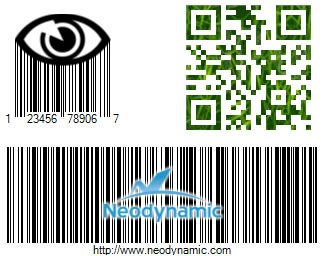
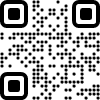
Create Artistic QR Codes with Custom Shape Patterns!
In addition to stamp images on barcode symbols, theArtModuleShape and ArtFinderShape properties allow you to customize the QR Code modules and finders!
ArtFinderShape Patterns


ArtModuleShape Patterns


QR Code Samples by combining the patterns...




Easy to Dev & Deploy
Easy as 1, 2, 3! (1) Just add the NuGet packageNeodynamic.SDK.BarcodeCore, (2) instantiate it in your preferred .NET language like VB.NET and C#, (3) set up barcode properties and that's it! XCOPY deploy the barcode dll bundled with your executable app or dll project.
Best-in-class Imaging Support
Barcode Professional for .NET STANDARD creates barcodes in raster formats like PNG, JPEG/JPG, PCX, TIFF, PCL & PDF as well as in SVG & EPS vector format! All barcode can be rotated at 90, 180 & 270 degrees. Rounded Border & Bearer Bars are also supported. High Quality DPI Resolution is supported for PNG & JPEG outputs.Not a Barcode Fontware
Our Barcode Encoder for .NET STANDARD is a graphic-based engine which renders high-quality & high-precision barcodes by using SkiaSharp Drawing API. Our SDK is not based on barcode fonts but generates barcodes in raster & vector image formats! Read why you should not use a barcode fontware in your .NET STANDARD projectsSystem Requirements
Barcode Professional is a .NET Standard 2.0 library, so it runs on any platform that supports .NET Standard 2.0 or later:
- .NET Framework 4.6.1+ (including Legacy ASP.NET MVC & WebForms)
- .NET Core 2.0+ and modern .NET (.NET 5 and later), including ASP.NET Core
- Mono 5.4+, Xamarin.iOS 10.14+, Xamarin.Android 8.0+, Xamarin.Mac 3.8+
- Universal Windows Platform (UWP) 10.0.16299+
Dependencies (NuGet): SkiaSharp 1.68.3+ and System.Text.Encoding.CodePages 4.4.0+.
Which Barcode Edition Do I Need?
The same GS1, ISO/IEC & AIM compliant barcode engine is available in these editions:
| Edition | Best for | NuGet package / delivery | Platforms |
|---|---|---|---|
| Barcode Professional for .NET Standard | Cross-platform .NET: ASP.NET Core, APIs, console, services, Xamarin | Neodynamic.SDK.BarcodeCore | Windows, Linux, macOS (.NET Standard 2.0) |
| Barcode Professional for Blazor | Blazor Server & WebAssembly apps | Neodynamic.Blazor.Barcode | Any Blazor host |
| Barcode Professional for Windows Forms | WinForms desktop apps, printing & reports | Neodynamic.WinControls.NetCore.BarcodeProfessional (.NET Core 3.1 & .NET 5+)Neodynamic.WinControls.BarcodeProfessional (.NET Framework) | Windows |
| Barcode Professional for WPF | WPF apps, XPS & vector printing | Neodynamic.WPF.NetCore.BarcodeProfessional (.NET Core 3.1 & .NET 5+)Neodynamic.WPF.Barcode (.NET Framework) | Windows |
| BarcodePro Web API for Docker | Any language, servers and cloud | Docker image neodynamic/barcodeprowebapi | Linux container (amd64 & arm64) |
| Barcode Professional for SSRS & PBIRS | SQL Server Reporting Services & Power BI Report Server | Installer: Custom Report Item (CRI) and DLL | SSRS 2005–2022, PBIRS |
| Barcode Professional for ASP.NET Legacy | Existing ASP.NET WebForms & MVC apps | Neodynamic.WebControls.BarcodeProfessional | Windows (.NET Framework 2.0–4.x) |
| Barcode Professional SDK for .NET Windows Legacy | Existing .NET Framework apps | Neodynamic.SDK.Barcode | Windows (.NET Framework 2.0–4.x) |
New web or cross-platform project? Use Barcode Professional for .NET Standard. See also the full feature comparison.
Barcode Professional for .NET Standard FAQ
- How do I generate a QR Code in C#?
- Add the Neodynamic.SDK.BarcodeCore NuGet package, create a BarcodeProfessional object, set Symbology = Symbology.QRCode and Code to the value to encode, and call Save() to write a PNG file or GetBarcodeImage() to get the image bytes.
- Which .NET versions are supported?
- Barcode Professional is a .NET Standard 2.0 library, so it works on .NET Framework 4.6.1+, .NET Core 2.0+, modern .NET (.NET 5 and later), Mono 5.4+, Xamarin.iOS 10.14+, Xamarin.Android 8.0+, Xamarin.Mac 3.8+ and UWP 10.0.16299+. See system requirements.
- Does it run on Linux and macOS?
- Yes. It renders barcodes with SkiaSharp, so it runs on Windows, Linux and macOS, including ASP.NET Core apps in Linux containers.
- Which barcode types are supported?
- More than 100 linear (1D), postal, stacked, composite and 2D symbologies, including Code 39, Code 128, GS1-128, GS1 DataBar, EAN-13, UPC-A, ITF-14, Data Matrix, GS1 DataMatrix, QR Code, GS1 QR Code, Micro QR, rMQR, PDF417, Aztec Code, MaxiCode, Han Xin Code, DotCode, Swiss QR Code, JAB-Code, USPS Intelligent Mail, Royal Mail Mailmark and Australia Post. See the full list of barcode symbologies.
- Which image formats can it generate?
- Raster formats PNG, JPEG, PCX, TIFF and PCL, PDF, and the vector formats SVG and EPS. PNG and JPEG support custom DPI for high-resolution printing.
- Does it use barcode fonts?
- No. It is a graphic-based engine, so there are no fonts to install on servers or client machines and barcodes render the same in every environment.
- Are the barcodes GS1 and ISO/IEC compliant?
- Yes. The encoders follow the GS1, ISO/IEC and AIM specifications, with auto-checksum, data validation and Bar Width Adjustment, so the barcodes pass verification required in retail, healthcare, postal and logistics.
- Can I use it from Java, Python, PHP or Node.js?
- The SDK is for .NET. For any other language use BarcodePro Web API for Docker, which exposes the same barcode engine as a REST API. See BarcodePro Web API for Docker.